
FAQs
How do I use another mod with Hachimi?
See the load_libraries option on the Config page. Note that some mods will not work with this method; they weren't really designed to be used with each other.
The update just finished installing but everything's still not translated. Why?
The translations may have been installed, but the game hasn't attempted to load the new translations yet. Simply navigate to another screen (that triggers a loading procedure) and you should see translations appearing.
Can I play the game while the update is in progress?
Yes, it is totally fine to continue playing the game while the translation data is still being updated, but do note that translations are disabled during update and will disappear when you navigate away from the current screen in the game. It should come back once it finishes installing and the game starts loading it (see above).
I accidentally closed the game while it was installing. Is it over for me?
Nope. Just open the game back up again and it should ask you to start downloading from the beginning.
What's that .tl_repo_cache file in my Hachimi folder? Can I eat it?
No. It's used to track the current state of the translation files for incremental updates later on; do not modify it manually or delete it.
Is there a version or other mod for Apple devices (iOS)?
No. Apple devices are very tightly locked down, making it very difficult to create or install any mods of this nature.
How do I uninstall Hachimi?
Windows: The installer has an uninstall option. If you no longer have it, you can download the latest one and use that.
Android: You will have to uninstall the patched game and install the original one normally.
Will I get banned for using Hachimi? Have there been bans?
Hachimi and similar tools violate TOS. You always carry the risk. It is however unlikely, and no bans relating to Hachimi or other translation tools have been reported since 2022.
I think I'm banned, how can I tell for sure?
This is what the message should look like when you are banned: 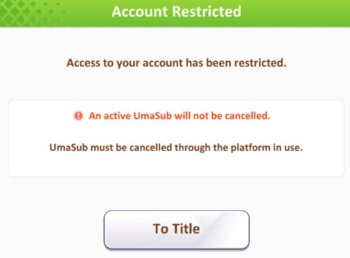
Can I play JP and Global simultaneously?
Yes, but you will need to use a workaround if using the DMM version. Check out these steps.
What is the difference between the Physics Update Modes?
These are modes defined internally by the game, and not implemented by Hachimi. Little is known about them.
ModeNormalis the default.Mode60FPSseems to restore some physics movements when increasing framerate, but can still be a little buggy sometimes.- Both
SkipFramemodes are unknown but seem to be broken.
How do I update on Android?
INFO
Uninstalling the game is only required for first-time install, not any form of updates.
Game
An in-game notification to update from the Play Store means you need to update the game itself by downloading the newest game APKs. You must then install those new files through UmaPatcher, which will also apply the newest available Hachimi Edge release.
Follow the install guide from step 4.
Hachimi
When a new version of Hachimi Edge is released, you can choose to install it for new features or fixes. You don't have to do this immediately. Doing so requires patching again.
Follow the install guide from step 5 to simply reinstall the current game version, or from step 4 if you no longer have the latest game APK files.
UmaPatcher
As UmaPatcher is a helper to patch and install the modded game, updating it is only needed in certain cases, like when you face install issues. There are no benefits to this in-game. In fact, as long as you have no issues, we recommend using your current version.
- If you haven't done it before, Settings -> Export signing key.
- Download and install the latest UmaPatcher Edge, updating the app in-place.
- (Optional) Continue what you were attempting.
I turned off Hachimi GUI/Overlay, how do I turn it back on?
First of all, you likely did this as a workaround on Android. The issue has been fixed since v0.15.1, so check that you have updated to the latest Hachimi Edge.
Open Hachimi Edge's config file (config.json) in a text editor and change the disable_gui value from true to false, then restart the game. This config file is located in the hachimi folder inside the game's installation folder. If you're uncomfortable with this or run into issues, it's safe to delete the config file as well. Hachimi will recreate a default one.
How do I find the game install folder?
Steam: Right-click the game in Steam -> Manage -> Browse local files
DMM: Click the 3 dots next to the game name in DMM -> 🛈 icon -> 📁 icon
Android: Not accessible normally, but some data is stored at Android/media/jp.co.cygames.umamusume (might differ with phone brand). For the full access, you need to have the game patched with ReVanced's "Export internal data documents provider" patch and use a file explorer with a document provider selector to open it or be rooted and access /data/data/jp.co.cygames.umamusume/files. (The tutorials on how to do these are out of scope for the project, so use Google.)